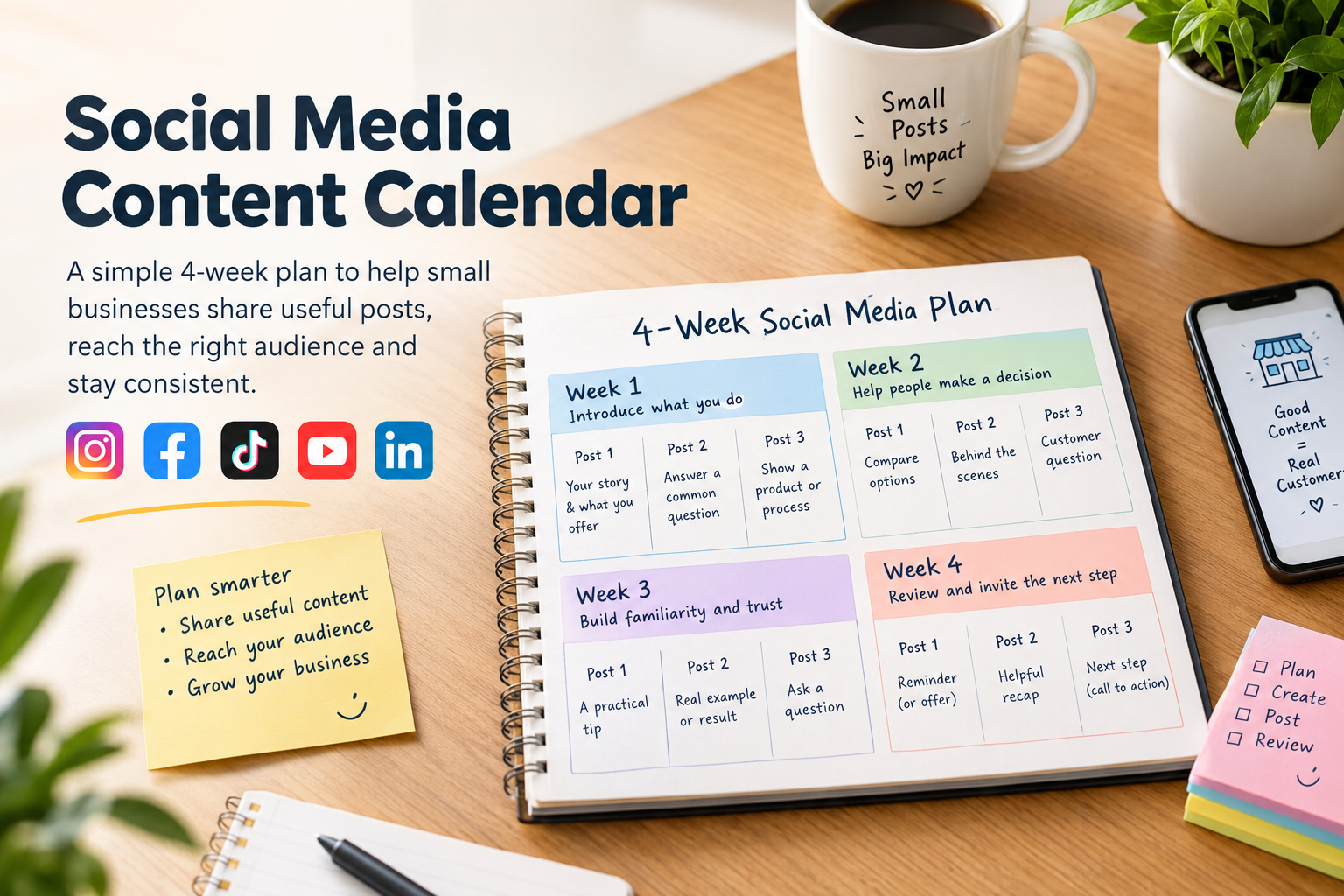
A social media content calendar helps a small business plan useful posts before the week gets busy. It does not need to be a complicated spreadsheet or a plan to publish every day. A simple calendar can help you explain what you offer, answer customer questions and stay consistent across the platforms your audience actually uses.
This four-week plan is a starting point for a small business or local brand. Adapt the examples to your products, services, audience and available time. Three posts a week is only a sample pace; choose a schedule you can maintain and review what your audience responds to.
Start with one goal and a clear audience
Before filling a calendar, decide what you want your social content to help with. You might want more people to discover your business, understand a product, ask a question or visit your website. Choose one main goal for the month so you can judge whether the posts are helping.
Then describe the people you want to reach. A clothing shop in Bangladesh might focus on customers who need sizing, fabric and delivery information. A tutor might focus on students preparing for a particular subject or exam. These details give you better post ideas than a broad goal such as “get more engagement.”
Use a repeatable weekly rhythm
To make planning easier, rotate through a few types of posts: useful advice, a product or service explanation, a question your customers often ask, and a story that shows the people or process behind the business. You do not need to use every format on every platform. Make the post fit the channel and the audience there.
A practical four-week content calendar
Week 1: Introduce what you do
- Post 1 — A clear introduction: Explain who you help, what you offer and how someone can get started. For a local bakery, show the types of orders available and how customers should place one.
- Post 2 — A useful answer: Address one common question, such as sizing, delivery areas, class schedules or how to choose between two options.
- Post 3 — A short demonstration: Show a product being used, a step in your process or a quick tip related to your service.
Week 2: Help people make a decision
- Post 1 — A comparison: Explain the difference between two products, plans or service options. Be specific about who each one suits.
- Post 2 — Behind the scenes: Share a real part of your work, such as preparing an order, setting up a class or checking a new product.
- Post 3 — A customer question: Turn a recurring question into a concise post. If you share a customer’s words or photo, get permission first.
Week 3: Build familiarity and trust
- Post 1 — A practical tip: Teach one small thing your audience can use. Keep it focused enough to understand quickly.
- Post 2 — A real example: Show a finished project, product detail or customer result with accurate context and permission where needed.
- Post 3 — A specific question: Ask for a preference or experience that is genuinely useful to your business and interesting to answer.
Week 4: Review and invite the next step
- Post 1 — A reminder: Share an upcoming deadline, available booking period or current offer, with clear terms and dates.
- Post 2 — A helpful recap: Summarize the most useful tip or answer you shared during the month. Link to the full explanation if one is available.
- Post 3 — A next step: Tell people how to contact you, browse your catalog, book or learn more. Make the action clear and make sure the link works on a phone.
Adapt the idea to each platform
Do not assume one identical post will work equally well everywhere. A short vertical demonstration may suit a video-focused platform, while a Facebook post may need more context for local customers. A professional service might share a detailed explanation on LinkedIn and a shorter visual summary elsewhere. Start with one useful idea, then adjust the format, opening and call to action for each platform.
If you need platform-specific ideas, see SMMCute’s guides on growing on Instagram, increasing TikTok followers, growing on YouTube and growing a Facebook Page.
Plan the post, not just the date
For each calendar entry, write down the audience, the main point, the format and the next step you want readers to take. Keep a draft caption and any needed photo or video with the entry. This makes it easier to finish a post without rushing and helps you avoid publishing the same message repeatedly.
Leave some open space in the plan for timely updates. A calendar should guide your work, not force you to publish a post that no longer makes sense.
Review the month before planning the next one
At the end of the month, compare posts that had similar goals. Look at the actions that matter to your business, such as useful questions, website visits, inquiries or bookings—not just reactions. Note which topics were worth repeating, which formats were difficult to produce and what your audience asked about.
Use those observations to plan the next month. Keep the topics that helped people, improve the ones that were unclear and remove posts that did not have a useful purpose. A content calendar becomes more valuable when it reflects what you learn about your audience over time.
Start with a manageable plan, make every post useful to a particular audience and give yourself room to adjust. That is a more reliable foundation for social media marketing than posting more often without a clear reason.