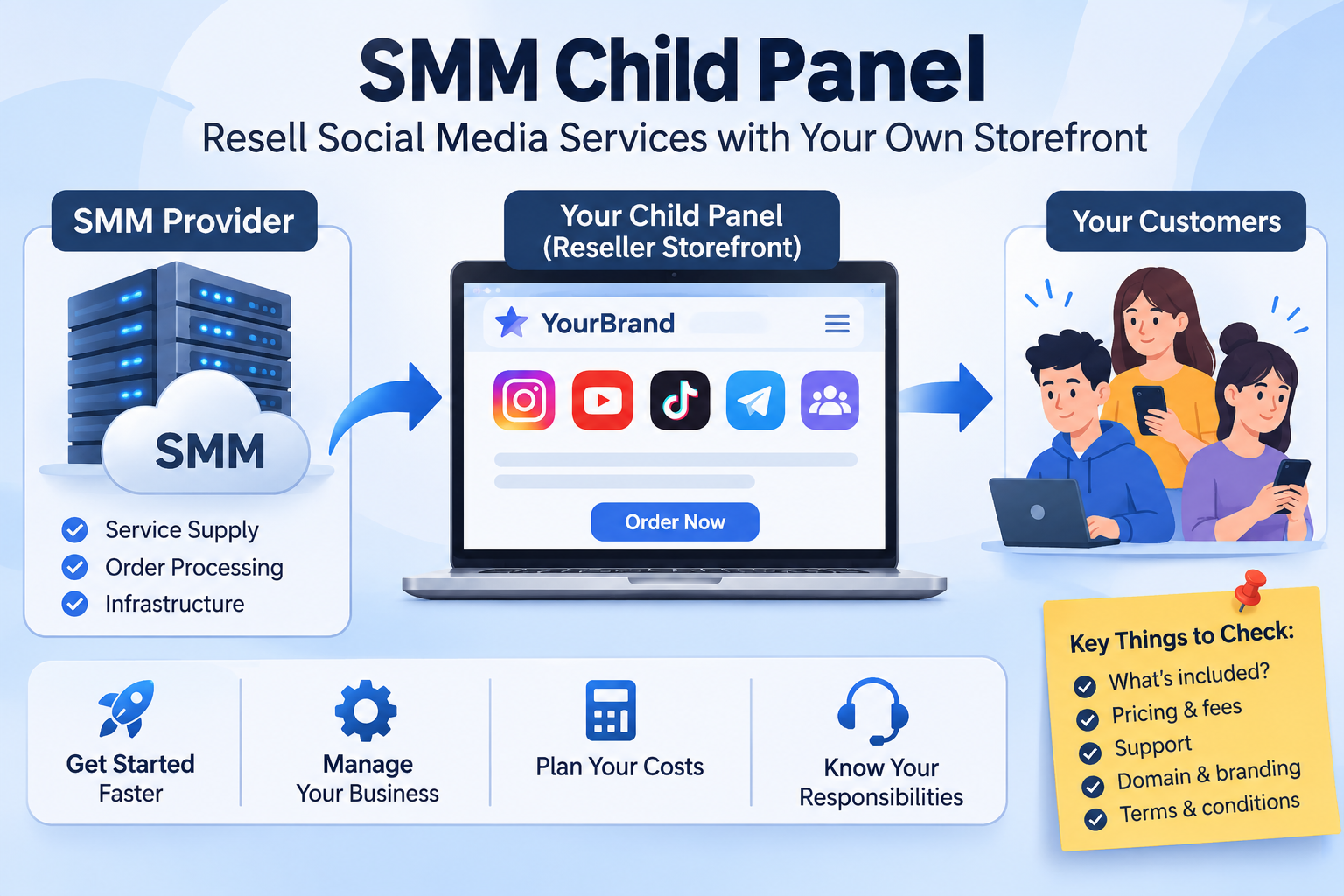
If you are researching ways to sell social media services, you may have seen the term child panel. It usually describes a customer-facing panel that a provider makes available to a reseller under a separate brand or web address. The reseller serves their own customers, while the parent provider supplies some or all of the underlying services.
The exact setup varies by provider. Before paying for a child panel, find out what storefront, service catalogue, pricing controls, payment options and support responsibilities are actually included. A child panel can reduce the work of setting up a storefront, but it does not automatically create customers or guarantee a profit.
What is an SMM child panel?
An SMM child panel is commonly a separate reseller storefront connected to a larger SMM provider. The child panel operator presents services to their own customers; the parent platform provides the underlying panel system, service supply or order processing described in its offer.
“Child panel” is an industry term rather than a universal product specification. One provider may include a branded site and a set catalogue, while another may offer different tools or controls. Do not assume that every child panel includes a custom domain, complete API access, the same payment integrations, or control over every service. Check the specific offer before ordering.
How does the arrangement usually work?
- A reseller chooses a provider. They review the available child-panel setup, current price, service catalogue, operating terms and support arrangements.
- The storefront is configured. Depending on the provider, this may involve a panel name, domain or other account settings. Confirm what is included and what setup remains your responsibility.
- The reseller presents services to customers. Customers use the reseller-facing panel to browse the available listings and submit orders under the displayed conditions.
- Orders are handled through the provider’s system. The parent platform’s role, processing flow and status information depend on the provider’s product and terms.
- The reseller handles their customer relationship. You may need to answer questions, explain listing conditions, manage pricing and coordinate support. Confirm these duties before you accept customer orders.
Ask the provider to explain the order and payment flow in plain terms. In particular, find out who receives customer payments, how your provider balance is funded, how customer issues are handled, and which party can investigate a delayed or incomplete order.
Child panel vs. reseller account vs. your own panel
These options can sound similar, but they describe different levels of setup and responsibility. The details still vary by supplier, so use this as a starting comparison and verify the terms of the offer you are considering.
| Option | What it generally gives you | What you still need to manage |
|---|---|---|
| Reseller account | Access to buy services from a provider for resale through your existing workflow or website. | Your storefront or manual process, your customer communication, and your own pricing and operations. |
| Child panel | A provider-supported storefront for serving customers under a separate reseller-facing setup, as defined by that provider. | Customer acquisition, customer support, pricing decisions and any duties stated in the provider’s terms. |
| Your own panel system | More control over the software, integrations and provider connections you choose to build. | Software, hosting, security, provider integrations, payments, maintenance and customer operations. |
What can make a child panel useful?
A child panel may suit someone who wants to test a reseller business without first building a complete ordering system. A hosted storefront can reduce some technical setup, and a ready catalogue may be faster to explore than connecting every service manually.
That convenience has limits. The provider determines which features and services are available, and the reseller may have less control over the underlying system than an operator who builds and maintains their own panel. Consider a child panel when a simpler launch matters more than full technical control, and compare the actual plan features rather than relying on the name alone.
Costs to include in your decision
Do not compare child panels only by a setup or subscription price. Depending on the arrangement, your costs may include:
- the child-panel setup or recurring fee, if one applies;
- a domain or other account setup costs, if they are not included;
- the balance needed to process customer orders;
- payment processing, currency conversion or withdrawal fees;
- time spent answering customers and resolving order questions;
- refunds, disputes, taxes and other operating expenses that apply to your business.
Your selling price needs to cover the provider charge and your operating costs while remaining clear to customers. A markup is not guaranteed profit: order volume, payment costs, support time and unresolved issues all affect the result. Prepare a basic cost calculation before you advertise prices.
Questions to ask before choosing a child panel
- What exactly is included? Ask which storefront features, catalogue tools, account settings and technical support come with the offer.
- Who controls the domain and brand? Confirm whether you can use your own domain, what happens if you leave, and whether you can keep your customer-facing identity.
- How are prices set? Check whether you can set customer-facing rates and whether service costs can change.
- How do orders and balances work? Understand how orders are funded, submitted, tracked, cancelled or refunded, and which status information you can see.
- What customer data can you access? Review the privacy terms, data handling and any export or account-closure process.
- Who handles support? Find out whether the provider supports you only, your customers directly, or both—and what response process applies.
- What happens if you want to move? Ask what happens to your domain, customer records, balance and order history if you stop using the panel.
- What rules apply to the services? Read the provider’s terms and the relevant social platform policies. Service availability does not remove platform-related risks.
Is a child panel right for you?
A child panel may be worth considering if you already understand your intended customers, can explain the service conditions clearly, and are comfortable handling the business side of reselling. It may be a poor fit if you expect the provider to find customers for you, guarantee earnings, or remove your responsibility for support.
Before launching, decide who you plan to serve, what questions those customers will ask, how you will explain delivery estimates and refill conditions, and how you will respond when an order does not go as expected. Start with a clear operating plan rather than treating the storefront itself as the business.
Using SMMCute as a reseller
SMMCute’s public API information describes tools for reseller workflows, including retrieving services, placing orders and checking balance or order status. API access and a child-panel storefront are distinct setups; review the current child-panel offer in your account to confirm what it includes, its price and its requirements.
SMMCute’s Terms of Service state that resellers are responsible for their own customers, pricing and support, and that SMMCute is not a party to agreements between a reseller and their end customers. Read the current terms and the individual service descriptions before offering services through your own business.
Make the decision from the actual offer
A child panel can provide a quicker route to a customer-facing reseller storefront, but the name alone does not tell you what you are buying. Compare the setup, ongoing costs, service access, order controls, support boundaries and exit process. Then estimate your costs and decide whether the arrangement matches the level of control and responsibility you want.
If you are comparing SMMCute’s reseller options, review the current API documentation, read the reseller terms, and check the live child-panel offer in your account for the details that apply to you.