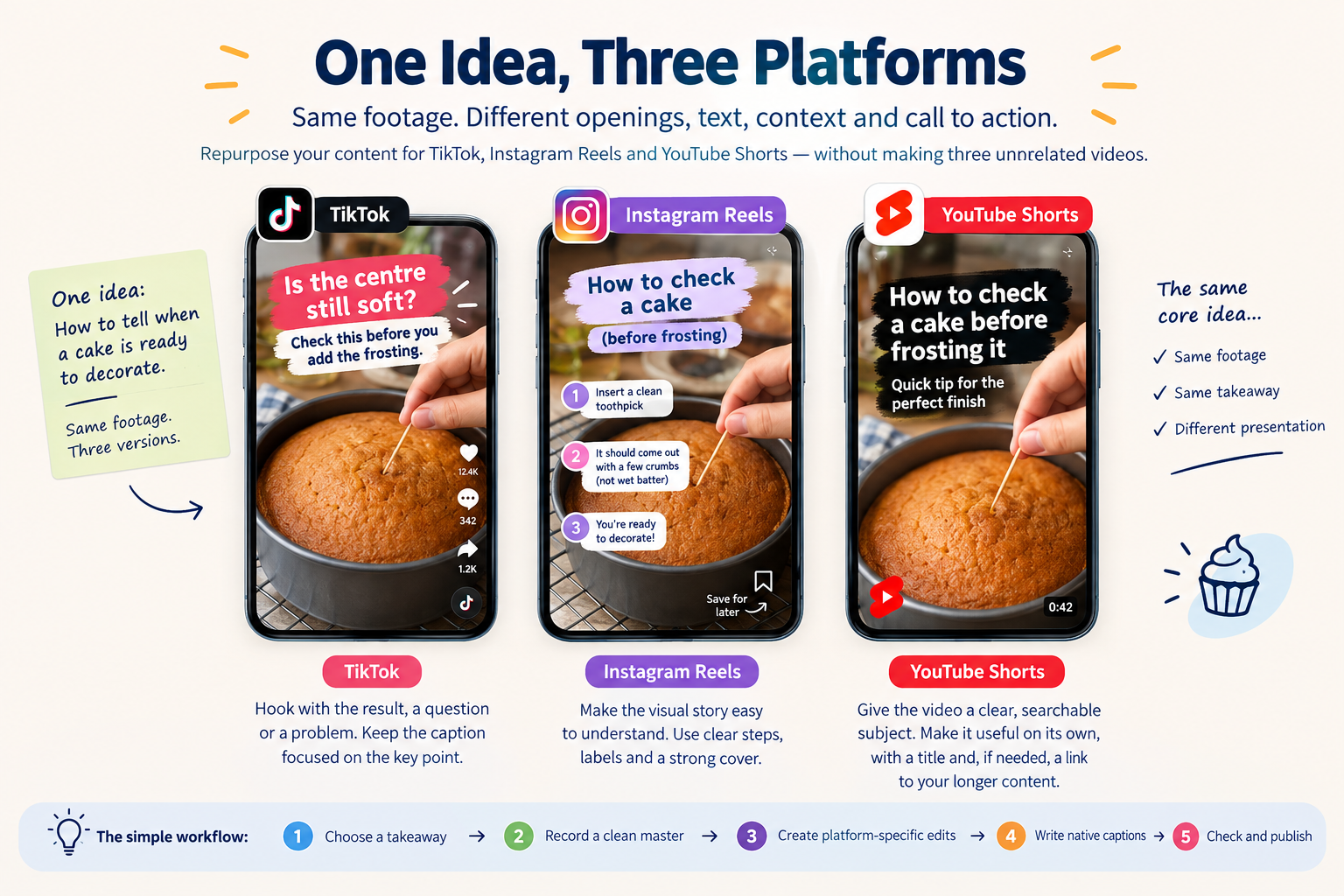
Making a separate video from scratch for every social platform can take more time than a small business has. But uploading the exact same file everywhere can also miss what makes each platform feel different. A useful middle ground is to reuse the core idea and footage, then edit the opening, text, context and call to action for each audience.
This guide walks through that process for TikTok, Instagram Reels and YouTube Shorts. The goal is not to make three unrelated videos. It is to make three versions that each make sense on the platform where someone finds them.
Start with one idea that can stand on its own
Choose a single useful point, demonstration or story—not a broad topic that needs a long introduction. For example, a home baker could show how to tell when a cake is ready to decorate. The same footage can support a quick visual reveal, a step-by-step explanation or a short answer to a customer question.
Write the main takeaway in one sentence before you record. If you cannot explain what the viewer will learn or see, the video idea may be too broad. Keep that takeaway consistent across versions; adapt how you present it.
Record a clean master video
Film the original footage before adding platform-specific text, stickers, music or captions. Save a clean copy so you can make each edit from the same source without carrying one app’s interface elements into another platform.
- Record vertically when your intended versions are short-form vertical videos.
- Keep the subject and important on-screen text away from the edges, where app controls and captions may cover them.
- Use clear light and audio, and capture a few extra seconds before and after the main action so you can trim each edit naturally.
- Say or show the key point early. Do not make viewers wait through a long intro to understand the video.
Captions can help people follow along when sound is off, but review them before publishing. Correct names, prices and instructions manually if automatic captions mishear them.
Make three edits from the same footage
TikTok: open with the moment that creates curiosity
Start with the result, a specific question or a problem your intended viewer recognizes. For the baker, that might be, “Is the centre still soft? Check this before you add the frosting.” Then show the check and explain what to do next. Keep the caption focused on the question and use a cover frame that makes the subject easy to identify.
TikTok’s editing tools let creators add text and choose a video cover after recording or uploading. If you use those tools, make sure the text supports the demonstration instead of covering the important action. See TikTok’s video editing and posting guide.
Instagram Reels: make the visual story easy to understand
Use the same core footage, but consider whether the edit needs clearer visual steps or a stronger cover for someone browsing your profile. The opening should quickly show what the Reel is about. Add concise on-screen labels where they genuinely help, and use the caption for useful detail that did not fit naturally into the video.
Choose a call to action that fits the post. A decorating demonstration might invite viewers to save the steps; a menu announcement might direct them to the menu. Avoid adding several competing requests at the end.
YouTube Shorts: give the video a clear, searchable subject
Make the Short understandable on its own, even if the viewer has never seen your other videos. Use a title that describes the specific result or question, such as “How to check a cake before frosting it.” If the clip is part of a larger lesson, make the Short useful by itself and point interested viewers toward the related video or channel resource.
YouTube currently classifies eligible square or vertical videos up to three minutes as Shorts; check its current Shorts guidance before planning around a length limit. Keep important visuals clear of interface overlays and review the finished video in the YouTube app before publishing.
Change the packaging, not the truth
A platform-specific hook should make the same promise as the video. Do not add a dramatic claim just to earn a pause if the clip does not deliver on it. Keep facts, demonstrations and offers consistent across all versions, and adjust only the presentation: the opening, pacing, text, cover, caption and next step.
Also check music, images and other material before reusing them. A sound or asset available inside one platform may not be available for the same use elsewhere. Use material you created, have permission to use, or can select through the destination platform’s permitted tools.
A simple repurposing workflow
- Choose one takeaway. Write down what a viewer should learn, see or decide.
- Record a clean master. Keep the original footage without one platform’s text, stickers or watermark baked in.
- Create each opening separately. Make the first line or visual fit the way you want to introduce the idea on TikTok, Reels and Shorts.
- Adjust the edit. Trim pauses, add readable text where it helps, and choose a suitable cover or title for each platform.
- Write native descriptions. Explain the clip in language that fits each platform rather than copying one caption everywhere.
- Check the final upload. Review framing, captions, sound, cover and links in each app before publishing.
Review each version on its own
Do not compare raw view totals as if every platform counts a view in the same way. Review each post using that platform’s available analytics and the goal you set for that version. You might look at viewing time for a demonstration, saves for a reference tip, comments for a question, or link visits for an offer. Keep the measures separate and use them to improve the next edit.
If a version performs differently, treat it as information about the opening, format, audience or context—not proof that the entire idea is good or bad. Keep the useful parts and test a more fitting presentation.
One idea can travel without looking copied
Repurposing works best when the original idea is strong enough to be told in more than one way. Keep the main value intact, then shape each version for the person who encounters it on TikTok, Instagram Reels or YouTube Shorts. That saves production time while giving every post a clear reason to exist on its platform.
For more platform-specific guidance, read SMMCute’s guides to TikTok growth, Instagram growth and YouTube growth.