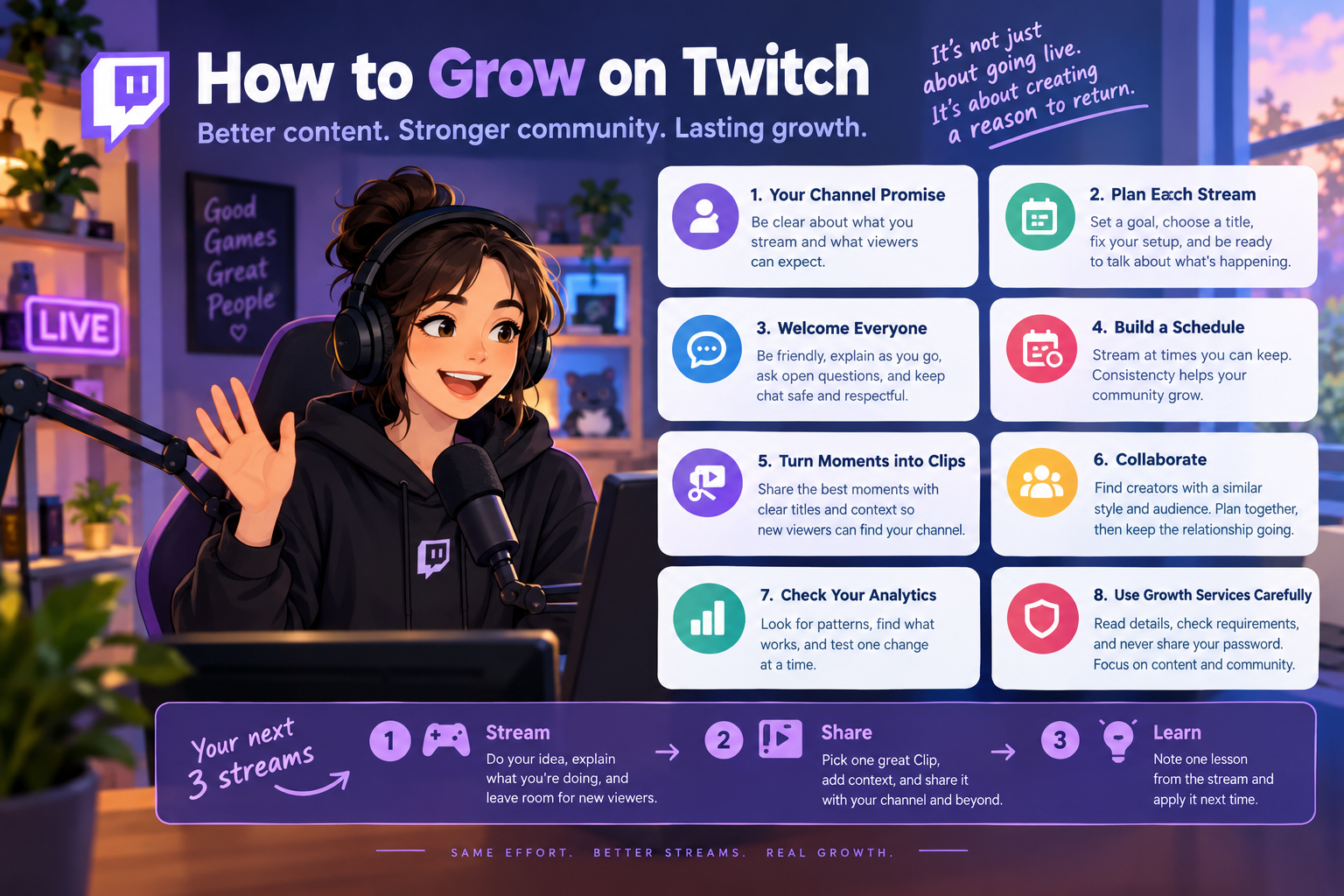
Growing on Twitch is not just a matter of going live more often. A channel needs a clear reason to watch, a welcoming experience for people who arrive, and a simple way for good moments to travel beyond a single broadcast. Those parts work together: discovery may bring someone in, but the stream itself gives them a reason to stay and come back.
This guide is for newer and growing streamers who want a practical routine rather than a promise of instant viewers. Focus on what you can improve from one stream to the next: your channel’s promise, the live experience, shareable moments and the signals in your own analytics.
1. Give your channel a clear promise
Describe your channel in one sentence that a potential viewer can understand. “I play games” is too broad to set an expectation. A more useful promise might be a particular game with relaxed coaching, challenge runs with chat choosing the rules, or a weekly co-op session for beginners. Choose something you can deliver consistently and that still feels natural to you.
Make your channel page support that promise. Use a readable name and profile image, a short description, and panels that tell visitors when you stream and what they can expect. Keep the details accurate; an elaborate schedule that you cannot maintain is less helpful than a modest one you can keep.
2. Plan a stream around a specific activity
Before going live, decide what the stream is about and what progress or moment might make it satisfying to watch. A goal could be finishing a quest, testing a strategy, learning a song, or letting chat vote between two options. A small plan helps you keep talking during quiet stretches and makes the broadcast easier to describe in its title.
Use an accurate title and the most relevant category for what is actually happening. Avoid stuffing the title with unrelated popular terms. Set up audio, game capture and alerts before the broadcast so viewers are not met with a long technical delay. If you need to troubleshoot, tell the audience briefly what is happening and when you expect to resume.
3. Welcome people without pressuring them
New viewers may listen before they decide to chat. Explain what is happening as you go, instead of relying on inside jokes or conversation that only regulars can follow. Ask open, low-pressure questions when they fit the stream, and respond warmly when someone joins in. Do not demand a follow or personal details as the price of being welcomed.
Set simple chat rules and use moderation tools that match your community. A safe, understandable chat experience helps regulars participate and gives newcomers a better first impression. As the channel grows, trusted moderators can help you stay focused on the stream while keeping discussions respectful.
4. Make a sustainable schedule
Pick days and times you can reasonably keep for several weeks. Consistency helps your existing viewers know when to return and helps you build a repeatable creative routine. It does not mean streaming every day. A few prepared broadcasts are often more useful than a schedule that leads to burnout or frequent cancellations.
Share schedule changes on your channel and any social accounts you actively use. If your availability changes, update the schedule rather than leaving old times in place. Treat the schedule as a promise to your audience, not a requirement to stream when you are unwell or unable to deliver a good broadcast.
5. Turn strong moments into Clips
A stream contains moments that are easier to discover and share than a full-length broadcast: a surprising play, a useful explanation, a funny exchange or a satisfying finish. Make Clips from moments that genuinely represent your channel, give them clear titles, and share the best ones where potential viewers can find them.
Twitch’s official guidance describes Clips as a way for people to get a feel for a channel even when it is offline. Twitch also lets eligible streamers and editors feature Clips on discovery surfaces. Review your Clips after each stream, choose moments that show what your channel is like, and use the current Clip settings and permissions in your Creator Dashboard. See Twitch’s guides to creating and sharing Clips and Featured Clips.
When you share a Clip off Twitch, add context and a clear next step, such as your channel name or next scheduled stream. Do not assume a short video will automatically convert into live viewers; make it easy for interested people to find the full channel and understand when you will be live.
6. Collaborate in ways that suit both communities
Look for creators with a compatible format, audience and tone, even if their channels are similar in size to yours. A shared challenge, co-op session or guest segment gives each community something specific to enjoy. Agree on the plan, timing and expectations beforehand, and make sure the collaboration feels valuable to viewers on both channels.
Afterward, thank your collaborator, share a suitable highlight and keep the relationship going beyond a single promotion. Raids and other community handoffs can also be a thoughtful way to support another live creator when their content is a good fit for your audience.
7. Review the stream, not just the viewer count
After each broadcast, write down one thing that worked and one thing to improve. Check which segments prompted conversation, where viewers seemed to lose interest, and which Clips people watched or shared. Compare similar streams over time instead of treating one unusually busy or quiet day as a verdict on your channel.
Use Twitch analytics to look for patterns in discovery and audience behavior, then test one change at a time. For example, try a clearer title for the next stream or move a recurring segment earlier. A simple review makes it easier to learn without changing your whole channel after every broadcast.
8. Set expectations for growth services carefully
Some streamers also compare third-party Twitch services, such as viewer or follower options. These are separate from the work of building an engaging stream and do not create genuine community, returning viewers or chat participation by themselves. Before choosing any service, read the individual listing carefully, check its requirements and delivery terms, and make your decision with Twitch’s current rules in mind. Never share your Twitch password with a service.
SMMCute’s Twitch SMM panel page describes the Twitch-related services available through the panel. Availability and conditions depend on the specific listing, so review its details before placing an order. For lasting channel growth, keep your attention on content, community and a schedule you can sustain.
A practical routine for your next three streams
Choose one clear stream idea and write a title that describes it. During the broadcast, explain what you are doing and make room for newcomers to join the conversation. Afterward, select one representative Clip, share it with context, and note one lesson from the stream. Repeat that routine for three broadcasts before judging whether the change helped.
There is no guaranteed shortcut to a loyal Twitch audience. A clear channel promise, a considerate live experience and a steady habit of improving give viewers a real reason to return—and give you a healthier foundation to build on.